preamble
As cybersecurity threats continue to grow, it is critical to understand and prevent possible attacks. Blast-RADIUS is a security vulnerability that severely affects the RADIUS protocol, allowing an attacker to bypass authentication and gain unauthorized access. This article will discuss how the vulnerability works, how to detect it, and what to do about it to help you effectively prevent potential security risks.

Figure 1: Blast-RADIUS Vulnerability Security Risks
Blast-RADIUS Basics
Blast-RADIUS is a security vulnerability affecting the RADIUS protocol (per RFC 2865). It allows a man-in-the-middle attacker located between a RADIUS client and a server to spoof a valid access-accept message in response to a failed authentication request, allowing the attacker to gain access to network devices and services without having to guess or force the decryption code and shared key. The attacker inserts a malicious attribute into the request that causes the authentication information in the legitimate server's response to collide with the attacker's spoofed message, ultimately converting the rejection to acceptance and adding arbitrary protocol attributes. However, the attacker would not obtain user credentials. This vulnerability is described in CVE-2024-3596.
Specifically, the attack uses a computational collision to attack the MD5 signature of the responding authenticator. Since this is a protocol level issue, any RADIUS implementation that does not use EAP and works over UDP unencrypted traffic (especially PAP, CHAP) will be affected.
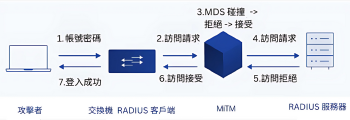
Figure 2: Schematic diagram of the Blast-RADIUS vulnerability (enlarged)
If it is not possible to use TLS or DTLS directly for transport encryption, the optional RADIUS attribute “Message-Authenticator” described in RFC 2869 can be used as an alternative. This method calculates a HMAC-MD5 checksum, any packets that do not pass this integrity check must be silently discarded. Since there is no shared key, an attacker will not be able to forge this HMAC-MD5 signature. This attack would be impossible if a valid message authentication attribute was required in all packets. Unfortunately, this attribute is only mandatory in the EAP authentication method, but not in PAP and CHAP; even in RFC 5080 it is only a "SHOULD" recommendation.
How to check for vulnerabilities
To check your implementation for this vulnerability, you can capture the communication packets between the RADIUS server and the RADIUS client and filter them based on the affected protocol characteristics. We can use the ProfiShark 或 IOTA The captured packets are intercepted and further analyzed by Wireshark. It is recommended to capture the actual two-way communication in inline mode (see Figure 3).
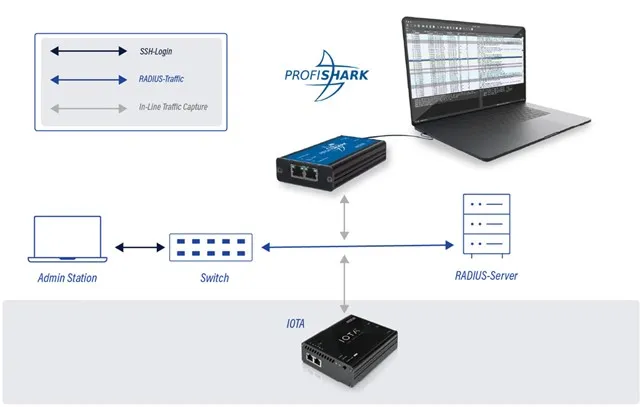
Figure 3: Interconnecting IOTA or ProfiShark between RADIUS client and server
Capture with Profishark
In ProfiShark Manager, go to the “Network Ports” tab and set ProfiShark to inline mode (uncheck “Span Mode”, as in Figure 4). Then integrate it inline to your network topology (Figure 3).
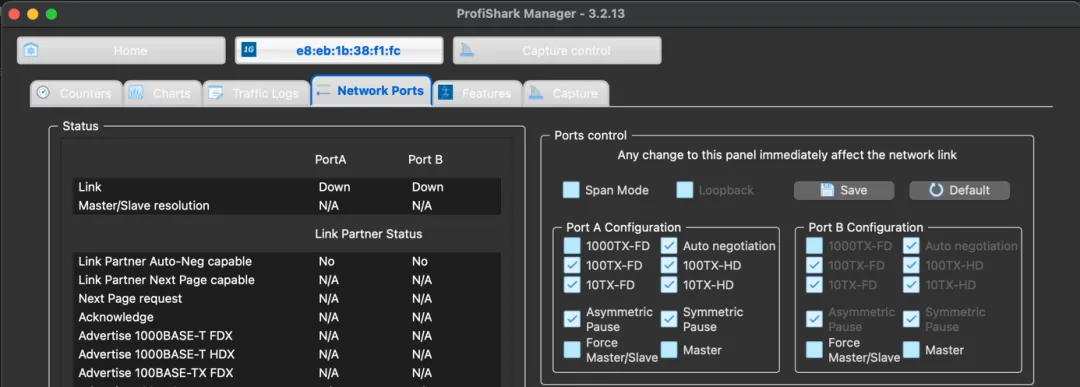
Figure 4: Disable SPAN Mode in ProfiShark Manager
Next, switch to the “Capture” tab, set the capture directory according to your needs, and then click the “Start Capture” button to start capturing data until enough packets are obtained (Figure 5), and then stop. Finally, export to PCAPNG file and open it with Wireshark.
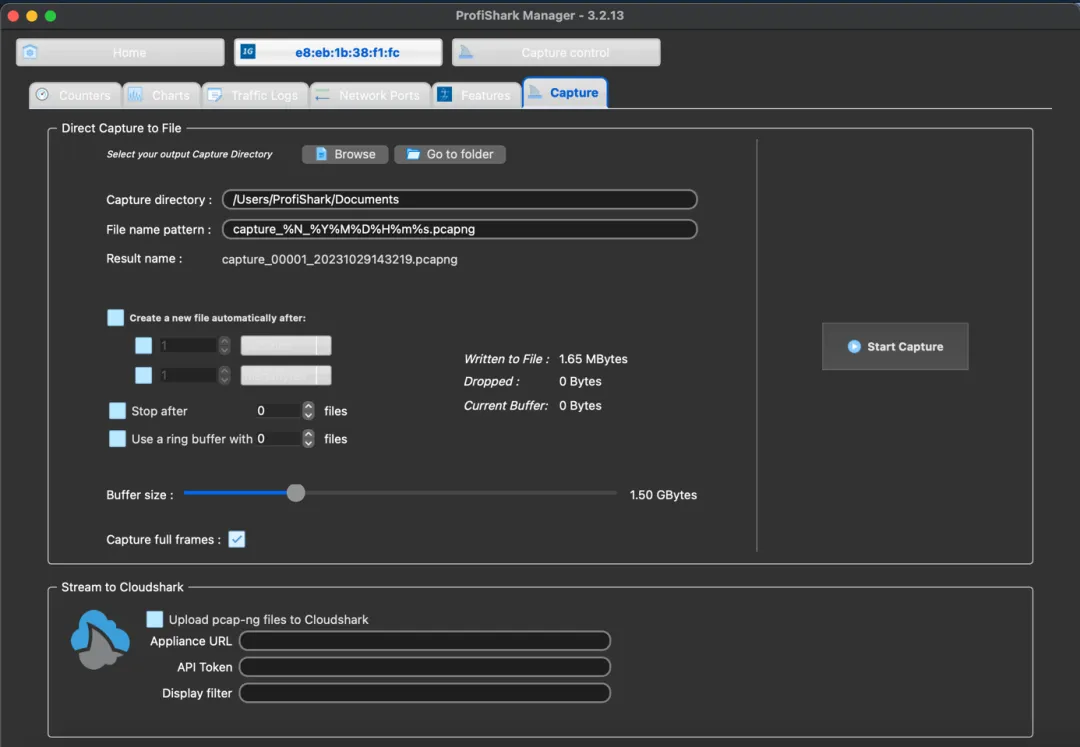
Figure 5: Starting to capture packets in ProfiShark Manager
Capture using IOTA
On the IOTA interface, first go to “Capture > Interface Configuration”, set the interface to inline mode (Figure 6), and then deploy the IOTA inline in a network environment. Click “Start Capture” through the device button or “Capture > Capture Control” page to start capturing (Figure 7).
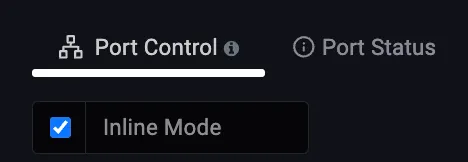
Figure 6: Configuration of IOTA All-in-One Traffic Monitoring Tool Interface
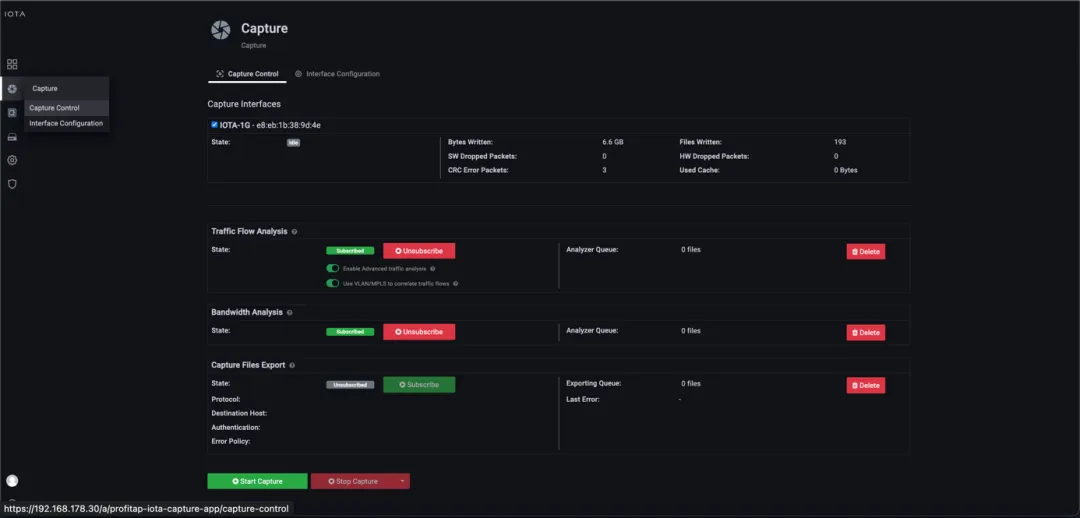
Figure 7: Starting to catch through the interface or device buttons
Now we can apply protocol or application filters to lock RADIUS packets, the easiest way is to set “APPLICATION” to “RADIUS”. The simplest way is to set “APPLICATION” to "RADIUS". You can also filter by "PROTOCOL_STACK=Ethernet | IPv4 | UDP | RADIUS". When a specific RADIUS stream is filtered, you can select it from the list of streams at the bottom. The PCAPNG file for the stream can be downloaded by selecting it from the stream list at the bottom (Figure 8).
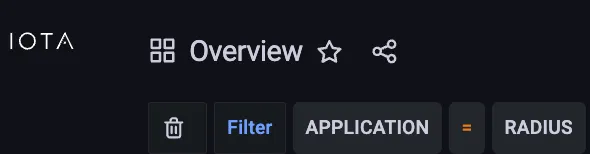
Figure 8: Filtering RADIUS packets on IOTA

Figure 9: Stream list can be downloaded from PCAPNG upon request.
Analyzing vulnerable execution
After opening the exported PCAPNG file, in Wireshark, we can use the following display filters to target potentially vulnerable RADIUS packets:
(radius.code in {1,2,3,11}) and not (radius.Message_Authenticator or eap) (Figure 10). This will get Access-Requests (code 1), Access-Accepts (code 2), Access-Rejects (code 3) and Access-Challenges (code 11) at the same time.
This excludes secure packets that have used EAP or have a Message-Authenticator.

Figure 10: Only RADIUS packets that do not contain Message-Authenticator or EAP are shown in Wireshark.
Once the “Message-Authenticator” attribute is seen in the packet (Figure 11), it means that the packet is HMAC-MD5 verified and is not susceptible to Blast-RADIUS attacks. If all RADIUS packets have this attribute, the attack will be blocked.
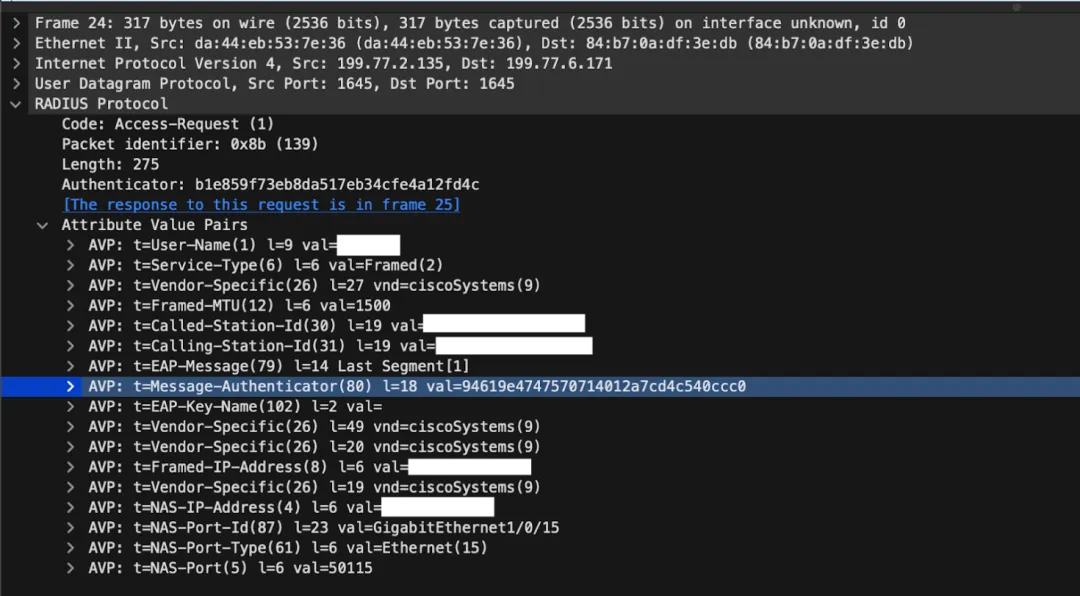
Figure 11: Message-Authenticator Preventing Attacks with RADIUS Access-Request
Product Recommendation
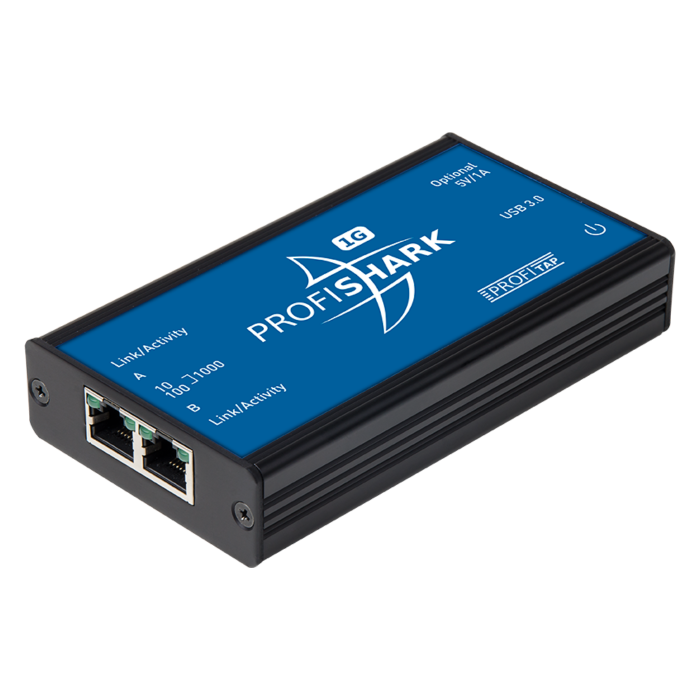
Profitap Packet Grabber Profishark-1G
- Highly Accurate and Plug-and-Play Ethernet Line Interception and Analysis
- USB 3.0 interface, no need for external power supply
- Switchable SPAN or inline mode for high deployment flexibility
- Ideal for troubleshooting, safety testing, and performance monitoring
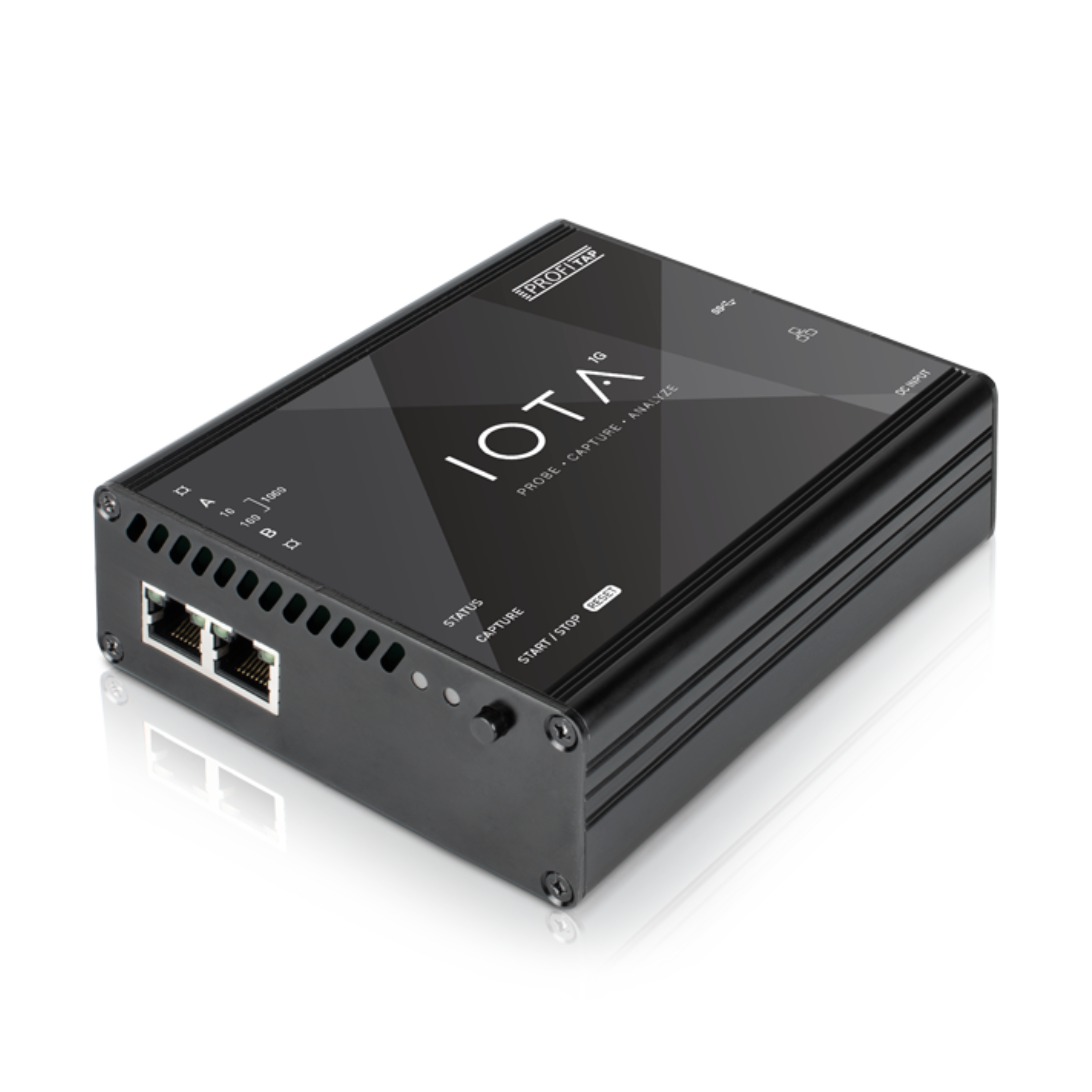
IOTA Integrated Traffic Monitoring Tool 1G
- Integration of packet capture, visualization and PCAP downloads.
- Supports 1G Ethernet speed for inbound interception
- Browser interface for remote control, fast filtering and downloads
- Suitable for security analysis, traffic monitoring, troubleshooting, etc.