
Mission-critical applications for image capture, display and transmission
With decades of expertise in the vision market, eBUS SDK is the industry's best choice for image capture, display and transmission in thousands of mission-critical automation, security and defense, and medical applications. eBUS SDK is a comprehensive solution that provides developers with a feature-rich platform that simplifies application development as well as receive and transmit functionality to streamline end-to-end data transfer between sensor devices and host applications. The eBUS SDK is a comprehensive solution that provides developers with a feature-rich platform that simplifies application development as well as receive and transmit functionality to streamline end-to-end data transfer between sensor devices and host applications.
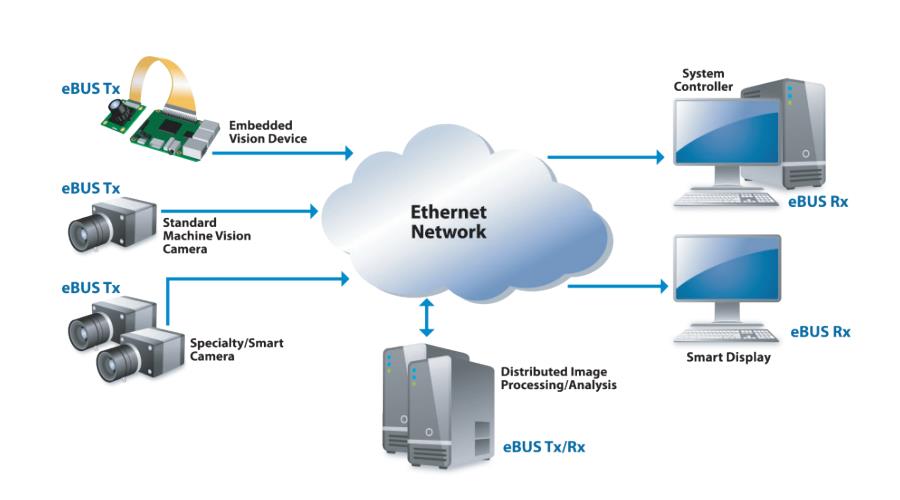
eBUS is a stand-alone SDK that allows developers to program a single piece of code that implements the receive and send modes of operation, or program code that implements both modes of operation. The eBUS SDK is based on a single API architecture and is portable via GigE, 10 GigE and USB receiver video for Windows, Mac and Linux operating systems. With the Developer Seat License, designers can develop production-ready software applications in the same environment as the end-user and quickly and easily modify applications for different media while avoiding the need to support APIs from different vendors. eBUS eliminates the need for developers to be tied to a specific camera as compared to SDKs provided by camera vendors. Instead of being tied to a specific camera, eBUS allows developers to choose the device that best suits the application.
Fully compliant with GigE Vision, USB3 Vision, and GenICam standards, the eBUS SDK provides seamless interoperability with Pleora's extensive portfolio of video interface products, as well as standards-compliant products from other manufacturers. Purchase of the eBUS SDK (Developer Seat License) includes access to online support and technical documentation. For specialized technical expertise, including installation and configuration support, see the Developer Support Subscription。
eBUS Tx for Sensor Devices
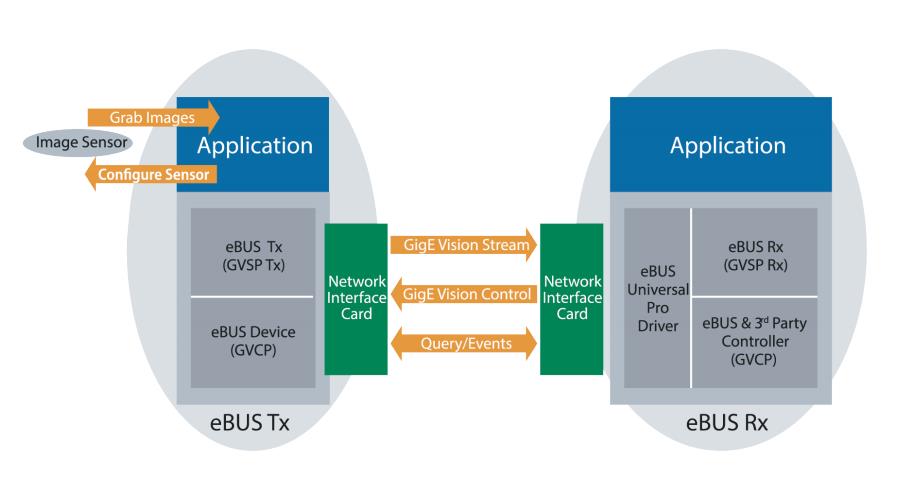
The eBUS Tx is a software implementation of the full-featured device GigE Vision Transmitter without the need for any additional hardware. Adding the eBUS Tx to the CPU's software stack makes it a fully compatible GigE Vision device, supporting image transfer and enabling the device to respond to control requests from the host controller. eBUS Tx complies with the GigE Vision and GenICam standards, allowing the end-user to utilize any standards-compliant third-party image processing system. eBUS Tx currently supports the GigE Vision standard. The eBUS Tx currently supports the GigE Vision standard. For USB3 Vision image transfer, please contact Pleora service.
eBUS Rx for host applications
The eBUS Rx manages the high-speed reception of images or data into the buffer for switching to the final application for the next step of analysis.
Developers can write applications that run on the host and seamlessly control and configure an unlimited number of GigE Vision or USB3 Vision and GenICam compatible sensors.
The eBUS Universal Pro driver reduces CPU utilization when receiving images or receiving data, leaving more processing power for analysis and inspection applications, while helping to meet the latency and throughput requirements of real-time applications. eBUS Universal Pro driver can be easily integrated into third-party processing software, bringing performance benefits to end-user applications. The eBUS Universal Pro driver can be easily integrated into third-party processing software to bring performance benefits to end-user applications.
eBUS Player Toolkit
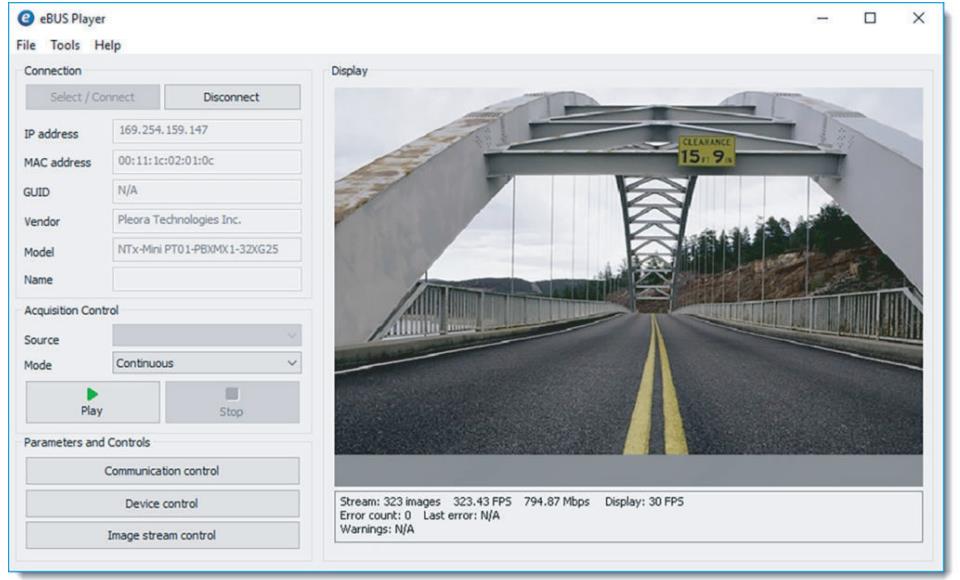
The eBUS Player Toolkit, which is included with the purchase of the Developer Seat License, is also available for free download from the Pleora website. eBUS Player Toolkit is an easy-to-use solution for viewing video streams, developing, testing, and evaluating the functionality of advanced applications. The eBUS Player Toolkit is an easy-to-use solution for viewing video streams, developing, testing and evaluating advanced application features. The toolkit includes:
- eBUS Player: Allows the user to control the parameters of GigE Vision and USB3 Vision compatible devices. The player receives images while allowing the user to view the data stream and adjust the device configuration settings to ensure the optimal setup of the vision system. Note: The source code for eBUS Player is included as one of the code examples in the SDK.
- eBUS Universal Pro Driver: Helps stream video from GigE Vision to vision system applications, ensuring consistent delivery with low latency while reducing CPU utilization.
- Raw Image Viewer: View the original binary image saved using the eBUS player.
- Camera Link Setup Assistant: Specifies the location of the CL protocol DLL file and automatically generates (or updates) the GENICAM_CLPROTOCOL environment variable.
Developer Support Subscription
The Developer Support Subscription provides one year (365 days) of functional support for the eBUS SDK by a team of dedicated senior application engineers. This support product is suitable for customers who require follow-on support during the testing and development phase. Subscription includes:
- Best practice guidance during basic installation and setup and troubleshooting support
- Configuration support, analysis and recommendations to ensure optimal performance
- Sample source code to help speed up the design process
- Provide specialized technical support and technical documentation
eBUS SDK Feature-rich GigE Vision and USB3 Vision compatible software development kit
- Image capture, display, and transfer via simple APIs that are portable to Mac, Windows, and Linux - no need to support multiple APIs from different vendors
- Works with vision-compliant imaging equipment from any vendor
eBUS Player Sample application for controlling imaging equipment and viewing image streams
- Controls the parameters of the imaging source by providing access to GenICam-compliant XML files.
- View data streams, balance colors, and save images, graphics, and device configurations.