As industrial automation technology continues to advance, the need for real-time data capture and analysis continues to grow. Especially in high-performance industrial networks such as EtherCAT, accurate packet capture and analysis tools are especially important. In this article, we will take a closer look at how the ProfiShark tool can be used to capture EtherCAT packets and demonstrate its power in real-world applications.
Why use ProfiShark to capture packets?
1. Easy to use:
Profishark as a dedicated packet capture hardware, in terms of performance, stability, accuracy are much better than ordinary packet capture tool, and there are some PLC or other can not directly run wireshark software dedicated controller as an EtherCAT master, in this case the use of dedicated packet capture tool will save a lot of work, and profishark serialized in the network brings low latency and jitter can be applied to most of the time-sensitive industrial protocols. And profishark serialization in the network brings very low latency and jitter, can be applied to most of the time-sensitive industrial protocols.
2.High resolution time stamp:
ProfiShark Provides a resolution of 8 ns Hardware time stamps.ProfiShark 1G+ 和 10G+ Provides a variety of advanced time stamping functions. GPSThe chip can be retrieved.UTCtime with internalPPSSynchronization with a typical accuracy of ±32 ns。 ProfiShark 1G+和10G+It can also be done throughSNTP(UseProfiShark Manager或CLItools) to retrieve the time, or use the internalRTC(real-time clock) and through an externalPPSSignal synchronization. Can provide PPS output to be used in conjunction with another ProfiShark equipment or any other receiving PPS The input devices are synchronized. These functions can be combined in different ways to provide a wide range of possible options for accurate and precise time stamping of data packets.
3.100% high fidelity traffic capture:
Installing TAP for all monitoring sources ensures that the 100%'s network traffic is replicated and transferred to the monitoring tool for real-time network monitoring.
4. TSN support.
Low Jitter: ProfiShark captures and analyzes network traffic supporting Time-Sensitive Networking (TSN) technology and accurately measures and records the timing of data transfers for analysis and troubleshooting.ProfiShark is protocol agnostic and L1 passthrough to all frames, tags and packages. This includes preempted frames (IEEE 802.1Qbu/802.3br), segmented frames, and CRC invalid frames.Profishark 100M, 1Gv5, 1Gv6, and 1G+ support TSN (IEEE 802.1Qbu/802.3br frames).
5.PoE pass-through function:
The ProfiShark 1G can be configured in either serial or out-of-band mode. Serial mode is fail-safe, with PoE pass-through, and once the TAPs are in place on the network, the monitoring ports can be connected and disconnected at will without breaking the network link. Out-of-band mode allows monitoring of traffic from SPAN/mirror ports or external TAPs.
Scene of ProfiShark use
- Grabbing Aethernet Packets
- Search packet CRC error
- Comparing Input Data Frames and Output Data Frames
- Measurement of network frame jitter and delay
- Analyze the process and principle of sending data from the master terminal
- Analyze the process and principle of processing network frames with the processing equipment.
- Real-time measurement of the master device
- Measurement and Processing Equipment Response Performance
- Monitoring and Backup of Industrial Ethernet Data
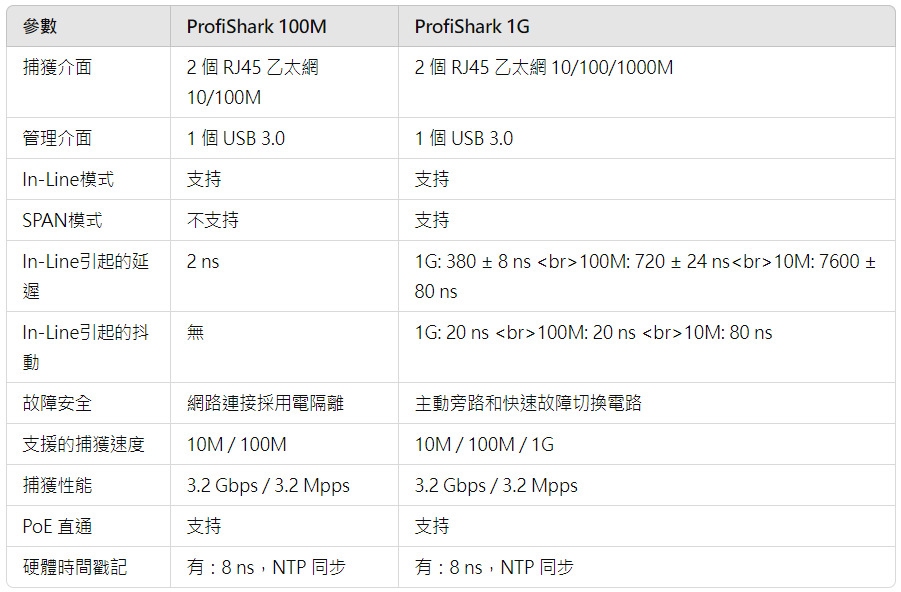
Technical Parameters
IV. Connections
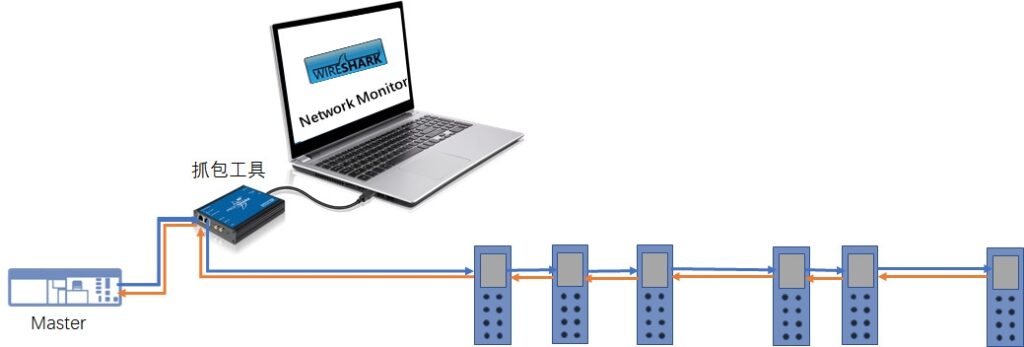
In an existing EtherCAT network, a Test Access Point (TAP) must be inserted to capture EtherCAT frames. It is recommended to install the TAP between the master and the first slave, but it can also be installed between any two slave devices. However, all input and output data can only be fully analyzed if the TAP is installed immediately after the master, as some data (e.g. LRW commands) will be overwritten by subsequent input data from downstream slaves. Therefore, the selected TAP device (e.g. ProfiShark 100M) should have a small propagation delay to avoid disturbing the timing of the whole network.
The TAP's “monitor” port is connected via a standard Ethernet cable to a computer running the Master Checker software.The ProfiShark 100M is a pocket-sized device with two RJ45 connectors on one side, a USB 3.0 port on the other, and an optional 5V DC external power connector.
- Place ProfiShark in front of the site where you need to monitor traffic (e.g., PLC's Ethernet port, CPU's Ethernet module, computers, servers, etc.).
- Disconnect the Ethernet cable from the EtherCAT master and connect it to one of the Ethernet ports on the ProfiShark. Then, use the Ethernet cable that came with the adapter to connect the other Ethernet port of the ProfiShark to the first slave.
- Now that ProfiShark is in the line of the packet to be analyzed, all traffic passes through that TAP adapter.
- After confirming that the communication between the two ends is normal, connect the power port (USB port) to a computer with profishark manager and capture and analyze the packets through profishark manager or Wireshark software.
V. How to use Wireshark to analyze EtherCAT packets
After successfully capturing EtherCAT packets using ProfiShark, we can use Wireshark to perform detailed analysis. Wireshark is a powerful network protocol analysis tool that can help us to examine and analyze the captured EtherCAT packets in depth. Below are the detailed steps and tips:
Setting up EtherCAT filters: EtherCAT packets have specific filters available in Wireshark. We can set up these filters to filter out packets of interest. For example, to filter out a specific type of packet where a slave is in OP status, you can use the following command:
ecat.ado == 0x130This command helps us to quickly find and analyze the target packets.Capture Packet Details: Once the EtherCAT packets are captured, we can view their details. By clicking on the packet, you can expand the structure and contents of the packet, including the EtherCAT packet's header information, the data area, and the specific values of each field. This information can help us understand the specific contents and meaning of the packet.
Analyzing Periodic Packets: In EtherCAT communication, each periodic packet usually contains three sub-packets. These sub-packets contain information about logical addressing, physical addressing, etc. By analyzing these sub-packets, we can understand the data exchange process between master and slave. By analyzing these sub-packets, we can understand the data exchange process between master and slave. For example, looking at the LRW (Logical Read/Write) command, we can see the response from the slave and the request data from the master.
Analysis Time Interval: Time interval analysis is an important tool for evaluating the performance of an EtherCAT system. With Wireshark, we can measure the time interval between packets to evaluate the real-time performance and stability of the system. This is done by looking at the time difference between two packets, which can be visualized more intuitively through Wireshark's “Time Display Format” feature.
Common Error Analysis: In EtherCAT systems, common types of errors include CRC errors, packet loss, long packet delay, etc. With Wireshark, we can detect and analyze these errors. With Wireshark, we can detect and analyze these errors. For example, by setting up a CRC error filter, we can quickly locate and analyze problematic packets. To analyze these errors, we need to be familiar with EtherCAT's working principles and processes, and be able to identify and diagnose common communication problems.
Data accumulation and learningAnalyzing EtherCAT packets is a learning process that requires a lot of work. Understanding and mastering the details of the EtherCAT protocol is the key, so as to be able to analyze it in practice. It is recommended to read relevant literature and technical documents, participate in technical exchanges, and continuously improve your skills and knowledge.
VI. CONCLUSION
Using ProfiShark and Wireshark, we can efficiently capture and analyze EtherCAT packets for real-time data monitoring and troubleshooting needs of industrial network systems.ProfiShark provides strong support for industrial automation networks with its high-resolution timestamping, 100% high-fidelity traffic capture, TSN support, and PoE pass-through. network with its powerful timestamping, 100% high fidelity traffic capture, TSN support and PoE pass-through capabilities. Combined with Wireshark's powerful analytics, we are able to view packet structure in detail, analyze time intervals of periodic packets, and detect and diagnose common communication errors to improve system performance and reliability.For more details~Now[Contact UsExchanges and discussions were held.