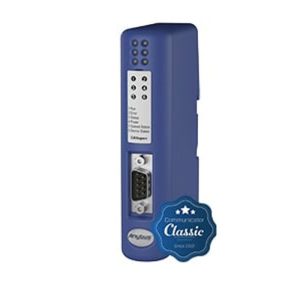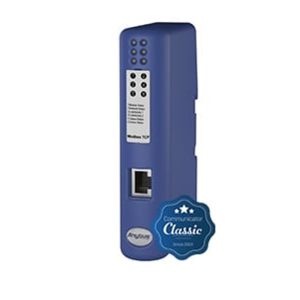

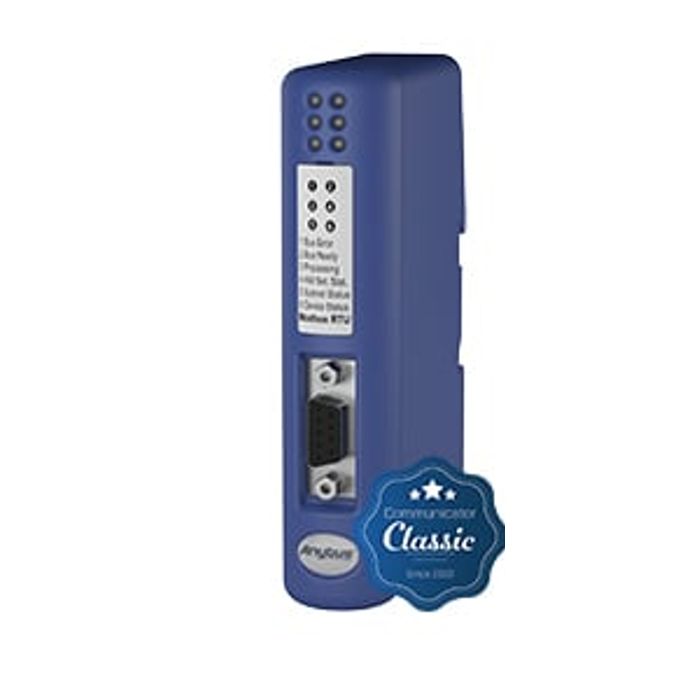
Anybus Communicator - Modbus RTU
將基於 RS-232/422/485 的串行工業設備和設備集成到 Modbus RTU 控制系統,無需對設備進行任何更改。只需連接、配置即可完成!
Anybus Communicator 是一種經過驗證且值得信賴的協議轉換器網關,可將非聯網工業設備和設備連接到 Modbus RTU。網關執行智能協議轉換,並將串行數據作為易於處理的 I/O 數據呈現給主 PLC/控制器。
Communicator 是纖薄的獨立網關,設計用於 IP20 和 DIN 導軌安裝,需要 24 伏電源。Communicator 已根據當前的 Modbus RTU 規範進行了一致性測試,以確保網路相容性。
Convert almost any type of serial protocols
Communicator is capable of converting almost any type of serial protocol, such as Modbus RTU, ASCII, DF1 or any other type of proprietary query/response or production/consumption protocol.
Typical Serial Applications
Typical serial applications include inverter drives, sensors, actuators, human-machine interfaces, barcode readers, RFID readers and industrial scales.
Description
I. Features and Benefits
- Convert virtually any RS-232/422/485 request/response or production/consumer protocol - e.g. Modbus RTU, ASCII, DF1 - in minutes.
- Pre-defined for Modbus RTU. Avoid the hassle of writing scripts and building serial Modbus frameworks with the 6-step Modbus RTU wizard.
- No hardware or software changes required for connected automation equipment
- PLC compatible with leading manufacturers such as Siemens, Rockwell, Schneider Electric, etc.
- Protocol switching is done by a manual operator, no PLC function block is required.
- Convenient save/load functionality means that completed configurations can be reused for many other installations.
- Includes “Anybus Configuration Manager” with flexible serial frame building capabilities.”
- Versions with dual-port switched Ethernet allow daisy-chaining and eliminate the need for external switches.
- Free worldwide technical support and consultation
II. Serial Protocol Configuration Features
Advanced programming skills are not required to set up Anybus® Communicator, as configuration is accomplished using the included, easy-to-use Windows™-based ACM (Anybus Configuration Manager).
- Optional RS-232/422/485 interface
- Predefined 6-step Modbus-RTU configuration wizard
- Optional pre-loading of DF1 commands. No scripting or serial frame construction required!
- Ability to configure ASCII or vendor-specific protocols (request/response or production/consumption through a visual framework construction interface)
- 多語言支援英語、德語、西班牙語、意大利語、法語、波蘭語、俄語、中文和日語
- Convenient save/load feature allows completed configurations to be reused in many other installations
- Password protection prevents unauthorized configuration uploads and downloads
- Serial line sniffer and built-in calibration and calculation for diagnostics and troubleshooting.
Three,Modbus RTUfunctionality
MODBUS RTU 從站接口特性
- 完整的 Modbus RTU 從站功能
- Maximum 512 bytes of input and 512 bytes of output data
- 線圈和寄存器訪問
- 通過板載 DIP 開關進行配置
- Modbus RTU 波特率 12-57,6 kbit/s
- 1x D-sub 9 母頭網路連接器
Technical Specifications
Communicator RS-232/422/485
| Agreement | Configurable RS-232/422/485-based production/consumption, query/response ASCII |
| Maximum number of stations | 31 (with RS485/422) |
| baud | 1,2-57,6 kbit/s |
| Physical Standards | RS232/422/485 |
| Modbus commands | 0x01 Read Coil, 0x02 Read Discrete Input, 0x03 Read Holding Register, 0x04 Read Input Register, 0x05 Write Single Coil, 0x06 Write Single Register, 0x07 Read Abnormal Status, 0x08 Diagnostics, 0x0B Get Communication Event Control, 0x0C Get Communication Event Log Write Multiple Coils, 0x10 Write Multiple Registers, 0x11 Report Slave ID, 0x14 Read File Record, 0x15 Write File Record, 0x16 Mask Write Register, 0x17 Read/Write File Record, 0x16 Mask Write Register, 0x16 Mask Write Register, 0x17 Read/Write File Record 0x10 Write Multiple Registers, 0x11 Report Slave ID, 0x14 Read File Record, 0x15 Write File Record, 0x16 Mask Write Register, 0x17 Read/Write Multiple Registers, 0x18 Read FIFO Queue can create custom commands (in Anybus configuration) Manager) |
| DF1 Service | 0x01 Integrity check, 0x02 Read diagnostics, 0x03 Read data, 0x04 Write data Customized services can be created (in Anybus Configuration Manager) Technical Details Standard |
Technical Details
| Dimensions (L x W x H) with Serial and Power Connectors | 120 x 75 x 27 mm 4,72 x 2,95 x 1,06” | |
| weights | 150 grams, 0.33 pounds | |
| Protection Level | IP20 Nema Grade 1 | |
| Shell Material | l PC ABS, UL 94 | |
| Mounting Position | whichever | |
| Installation | DIN rail (35 * 7,5/15) | EN50022 |
Certificates
| UL | File No.: E203225 | UL 508 Industrial Continued. Equation |
| Dangerous places | Category 1, part 2, groups A, B, C and D, T4 | ISA 12.12.01 |
| CE | 2004/108/EC | EN 61000-6-4 EN 61000-6-2 |
Electrical Characteristics
| Power supply | 24 VDC +/- 10 % |
| power wastage | 300 mA maximum, 100 mA typical |
Environmental Characteristics
| Reverse Voltage Protection | yea | |
| Short Circuit Protection | yea | |
| Current isolation on subgrids | yea | EN 60950-1 |
| MTTF | >550 000 hours | Telcordia Issue 2, Method 1 Case 3 at 30 o C |
Hardware Characteristics
| Working Temperature | 0 to 55 degrees Celsius, 32 to 131 degrees Fahrenheit |
| Storage Temperature | -40 to 85 degrees Celsius, -40 to 185 degrees Fahrenheit |
| Relative Humidity | 0-95% Non-condensing |
| Mounting Height | Up to 2 000 m |
Industrial Environmental Resistance and Radiation Resistance
| Electrostatic discharge | +/- 4 kV | EN 61000-4-2 |
| High Frequency Electromagnetic Field | 10 V/m 80 MHz - 1 GHz 3 V/m 1,4 GHz - 2,0 GHz 1 V/m 2,0 GHz - 2,7 GHz | EN 61000-4-3 |
| Fast Transients | +/- 1 kV | EN 61000-4-4 |
| Surge Protection | +/- 1 kV | EN 61000-4-5 |
| RF interference | 10 Volt/RMS | EN 61000-4-6 |
| Radioactivity (10m distance) | 40 dB 30 MHz - 230 MHz 47 dB 30 MHz - 1 GHz | CISPR 16-2-3 |
V. Delivery contents
- Configure Cable (RS232) Port
- Installation Sheet
- Dsub with screw terminals for subnets
Ordering Information
訂購代碼:AB7010
Contained components:
- Quick Start Documentation
- Configuration cable (RS-232) shipped with each individual Communicator
-Each individual Communicator is shipped with a D-sub connector with screw terminals for serial subnets.
- Downloadable Configuration Software
- (excluding power supply)
Optional accessories are available:
- USB-RS-232 Configuration Adapter (Order Code: 019570)
Guarantee: 3 year warranty. For purchase instructions and terms and conditions, please contactsupport@hongtronics.com