I. Introduction:
The so-called "gateway" is commonly referred to as a "protocol converter", which is capable of converting one communication protocol to another to meet the communication needs of real-world applications, thereby realizing investment protection. Hongke Gateway modular gateways provide an excellent way to quickly, easily and cost-effectively connect different networks in order to comply with investment protection.
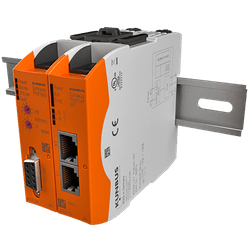
The KUNBUS Gateway gateway can be mounted on DIN rails and is also easily removable. The protocol itself is housed in a compact module with a housing size of 22.5 x 101.4 x 115mm, which is very compact. A complete gateway consists of two gateway components, which only need to be connected to the corresponding gateway components via jumper cables. This design provides a high degree of flexibility in operation, enabling the integration of the required gateway protocol components, and also allows the replacement of only the individual gateway components at any time, without having to replace the entire communication module, saving costs.
The Hongke Gateway series has a maximum output of 3 watts and a voltage tolerance range of -15 to +20%, with an integrated WebServer and FTP Server (for firmware refresh). Currently the gateway supportsSlave stations for PROFINET, EtherCAT, EtherNet/IP, CANopen, DeviceNet, Modbus RTU, Modbus TCP, POWERLINK, PROFIBUS, Sercos III, DMX masters and slaves。
This example demonstrates how to use a PROFINET master to complete the configuration of a Hongke Gateway gateway for the PROFINET to EtherCAT protocol.
II. Tools required:
1 Hongke PROFINET IRT Gateway
2 Hongke EtherCAT Gateway
3 Jumper cables
4 KPA Studio
5 Hongke Configurator
6 Adjustable Power Supply
7 Cables
8 Hongke Master Card
III. Steps/methods:
1、Gateway structure: Since Hongke Gateway is a modular gateway, a complete gateway is composed of two gateway components, so the first step is to select the actual need for communication protocol gateway components, this example to Hongke PROFINET IRT gateway to EtherCAT gateway as an example. The complete gateway structure is as follows:

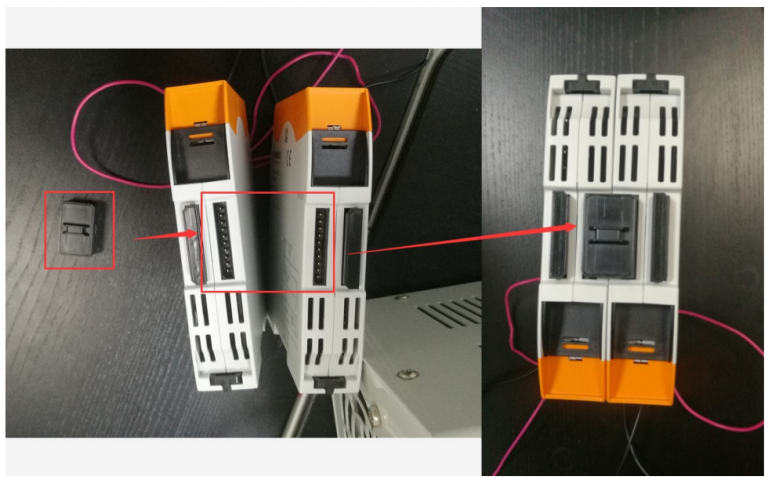
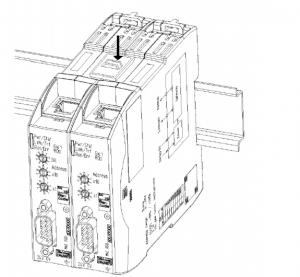
2、 Module Installation: Use the supplied plug-in jumper connectors to connect the interconnect ports to each gateway component. If installing to the control cabinet, it can be mounted directly on the DIN rail.
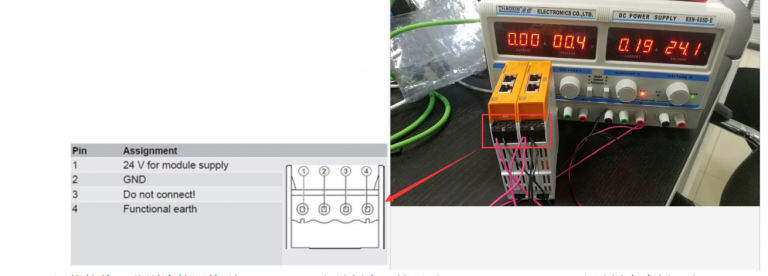
3. Power supply: Connect the power supply cable correctly to supply 24V power to the gateway module.
4, Network connection: connect the network cable to PROFINET master board (here take Hongke PROFINET master board as an example) and EtherCAT master PC (here take KPA Studio Windows master as an example, you can also choose TwinCAT), pay attention to the distinction between input and output ports.

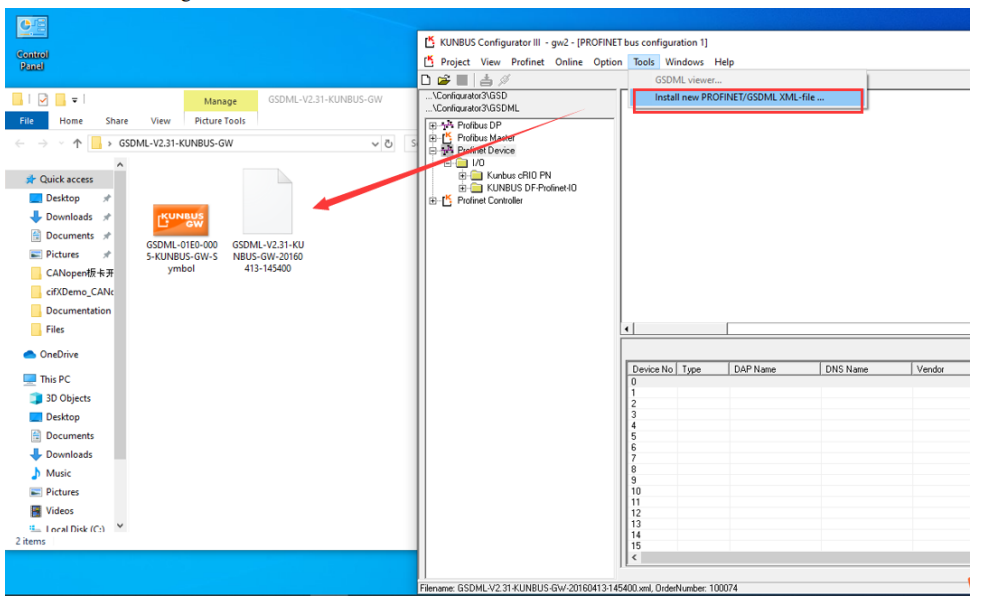
5. Gateway Configuration: In order to enable the master to correctly identify the gateway slave devices, both PROFINET network and EtherCAT network need to be configured in the corresponding configuration software for network configuration. The first step in PROFINET configuration is to install the Hongke GW slave GSD file into the Hongke CONFIGURATOR. CONFIGURATOR, select Tools→Install new PROFINET/GSDML XML-File, then find the GSD file: GSDML-V2.31-Hongke-GW-20160413-145400 and install it as follows:
6. The second step of PROFINET configuration is to drag the corresponding device directly to the configuration window for configuration configuration.
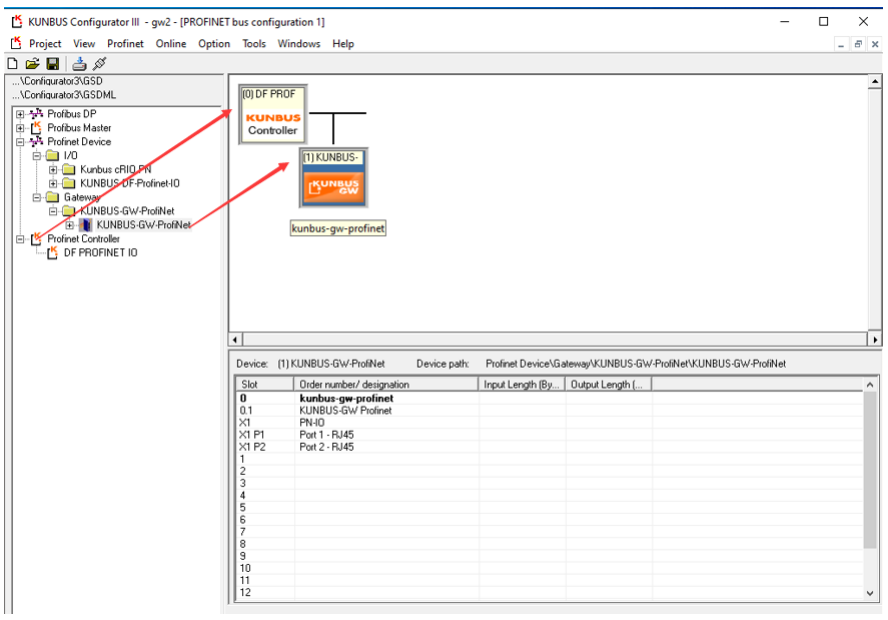
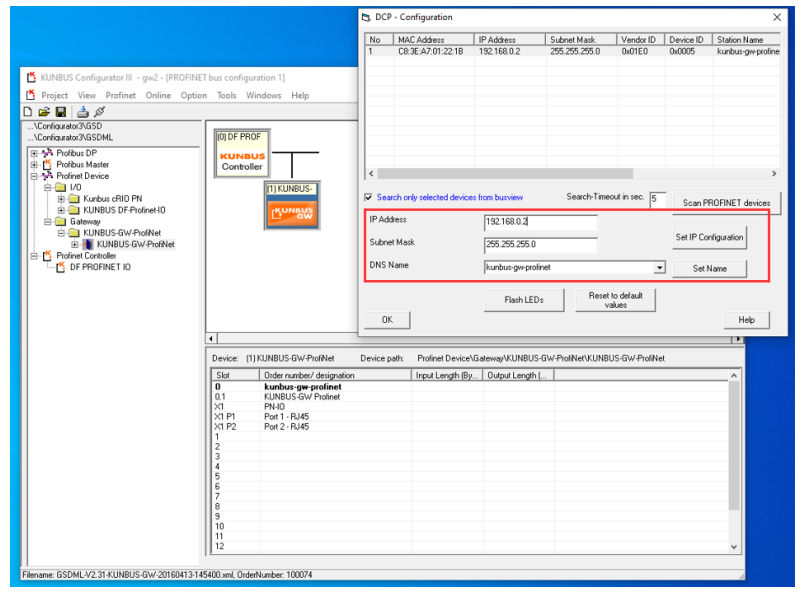
7, RROFINET configuration of the third step, the use of DCP on the slave to set a fixed IP address and NAME name, here is for the Hongke Gateway gateway, and does not have to carry out this operation, but if the master to the gateway configuration can not be found after the slave device, it is recommended to use this way to do further setup.
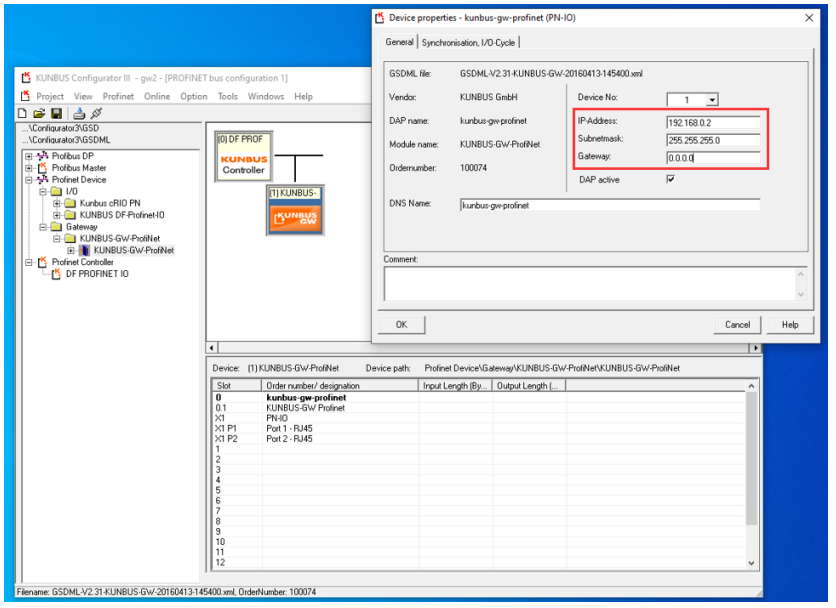
8, PROFINET configuration of the fourth step, respectively, double-click the configuration window of the device, the master and the gateway to set the necessary parameters, mainly IP address settings, the example of the master IP Address:192.168.0.1 Subnet Mask:255.255.255.0; gateway in the IP parameters and the last step of the DCP settings to maintain consistency, as follows IP Address:192.168.0.1 Subnet Mask:255.255.255.0; the IP parameters in the gateway are the same as the DCP settings in the previous step, as follows

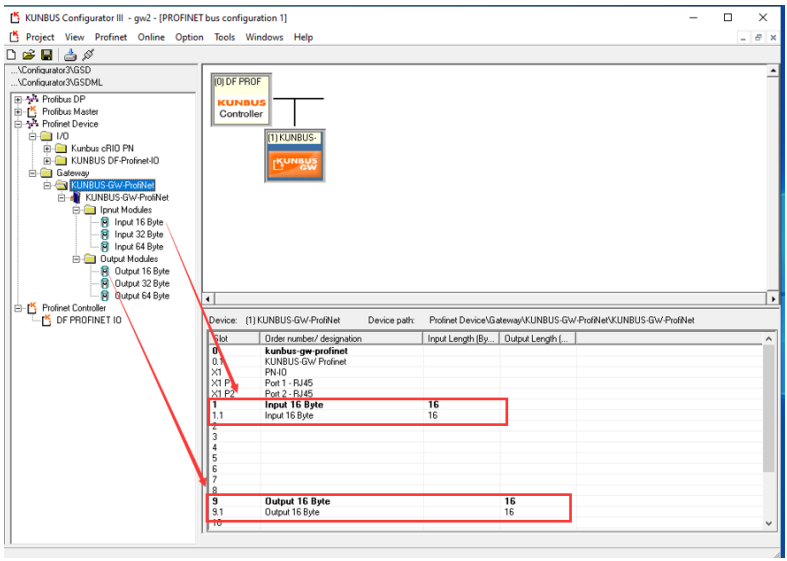
9, PROFINET configuration of the fifth step, add the slave input and output variables (slave input and output configuration), here added 16bytes of input and output, the module can be up to 512bytes. so, PROFINET configuration is basically complete, and then you need to keep the configuration (select Save control) and download (select Dowload control) Then you need to keep the configuration (select the Save control) and download (select the Dowload control) to the master controller.
10, gateway configuration at the other end is to configure the EtherCAT gateway components, this step is relatively simple, to KPA Studio on Windows as the master, for example, just load the EtherCAT gateway slave description file Gateway_Component_EtherCAT_R02.xml to the master corresponding to the path, choose KPA Studio→Actions→Open slaves library folder, then copy the xml file to the opened path, then reload the xml file, select KPA Studio→Actions→Reload slaves library, and then scan the whole network. Then you can scan the whole network:

11. Communication test: After correctly completing the network configuration of PROFINET and EtherCAT respectively, you can use the gateway of PROFINET to EtherCAT protocol normally. The following are the corresponding test data. As shown in the figure:
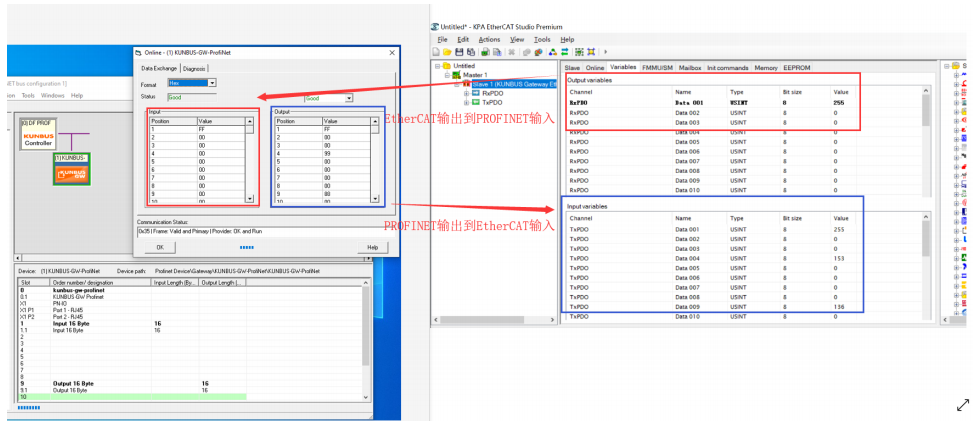
12. At this point, the configuration and testing of the Hongke modularized gateway is complete.
HK-KB Series Gateway
Variety of combinations to connect different protocols
Maximum data size 512 bytes
Integrated Web server, FTP firmware update
Modular installation, simple kit to connect modules easily
Cycle time 2~3ms; cycle time between gateway modules 1.2ms
Power supply 24 V; maximum power consumption < 3 W
Industrial package, current isolated, 0-60°C temperature range